Claude for small business starts with 6 folders.
Ryan “RyMac” McKinney · USMC · 30 August 2026 · 9 minute read
Anthropic launched Claude for Small Business on 13 May 2026. It's a switch you flip. It drops Claude inside QuickBooks, PayPal, HubSpot, Canva and DocuSign. Every guide on page 1 shows you how to flip the switch. Not one of them tells you what to file underneath it. That's the part that decides whether the answers come back right, or come back confident and wrong. That part is the ICM folder system, and this is me setting one up on camera.
41 minutes, unedited. A real gutter cleaning company, 9 years in business, filed from nothing while you watch.
The short answer
Claude for small business is a set of connectors. It reaches into the tools you already pay for.
The reaching isn't the problem. What it reaches into is.
Most small businesses have never been written down anywhere. The prices are in the owner's head. The rules are in his phone. What he charged the lady on Elm Street 2 years ago is in his truck.
So the connector grabs whatever is closest. Then it hands you back something that sounds certain. This is the same failure I wrote about in why Claude forgets what you were doing, arriving through a different door.
You fix it by writing the business down first. 6 folders. 2 text files. Then you connect things.
Page 1 tells you to connect first
I pulled the search results for "claude for small business" before I wrote this. Every result on page 1 is an install guide.
Anthropic's own tutorial: open Cowork, click Customize, click Plugins, find Small Business, click Install.
The most complete guide up there runs 4 steps. Get the right plan. Install the plugin. Connect your apps. Build your CLAUDE.md.
Read that order again. The CLAUDE.md file is step 4. The apps are already plugged in by then.
That's backwards, and it's backwards in a way that costs money. The connector inherits the mess. Then you spend your afternoon correcting an assistant that's guessing.
What I did instead, on camera
A customer bought my done for you package, watched the builds, then went quiet. He came back with the question underneath all of it. If I get hired by a small business, how do I know what to set up for them?
So I built one live. A guy who cleans gutters, 9 years in business.
Nothing about his operation was written down. It lived in his head, his phone and his truck. His AI started over every single time. That's the same reason I keep telling people to skip the 7 subagents and fix the filing instead.
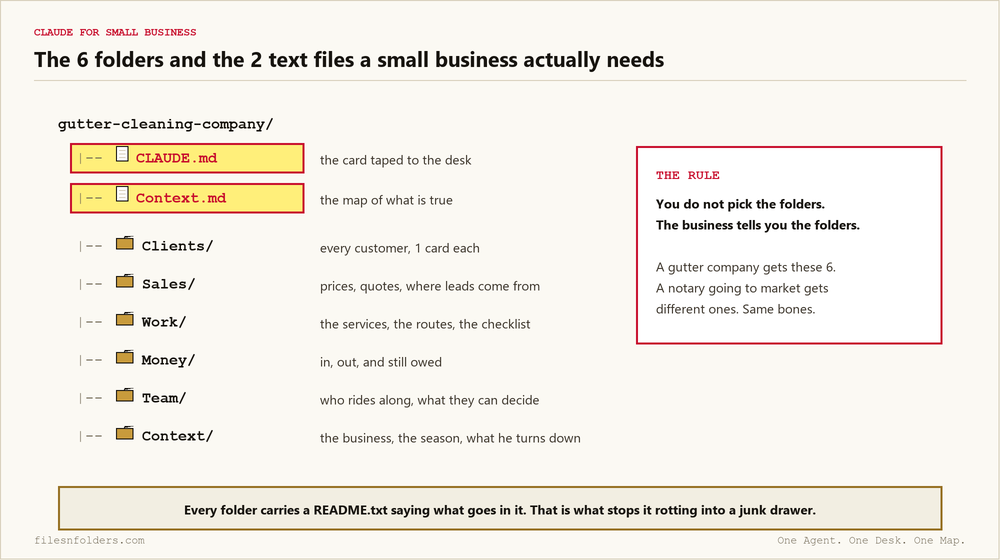
The 6 folders
Clients. The people whose gutters he cleans. 1 card each, with the address, the notes, every service date, what he charged, plus when they're due again.
Sales. The only home for a price. 3 bands by house type. Quotes that went out, which ones came back, which ones didn't.
Work. The 2 things he actually sells, in his own words. How a job runs from the first ladder to the truck load.
Money. In, out, still owed. An unpaid invoice lives here. It doesn't also live somewhere else.
Team. Who rides along. What a helper decides alone. What waits for a phone call.
Context. The stuff that never changes. The business, the season, the jobs he turns down.
On top of the 6 sit the 2 text files. CLAUDE.md is the card taped to the desk. Context.md is the map of what's true. Both get read before anything else happens, which is the arrangement laid out in the directory structure post.
Every folder also carries a README.txt saying what goes in it. That single text file is what stops a folder rotting into a junk drawer 6 months later.
You don't pick the folders
This is the part I want you to take, and it's 4 minutes 51 seconds into the video.
The business tells you the folders.
Jake Van Clief's own blueprint has 4 folders, because Jake makes content. The free kit on this site has different ones, because that one's built for an agency. The gutter guy gets these 6.
Same bones every time. Different labels. The business picks the labels.
A commercial real estate investor gets Deals In, Screen, Underwrite, Stress and Decide. That's the CRE underwriting folder I built off 1 DM in 53 minutes.
My dad's notary business is the clean example. He's going to market for the first time, so he isn't sitting on repeat customers or routes. His folders start with research, then positioning, then presence, then outreach. Giving him Clients and Money on day 1 would be handing him drawers with nothing to put in them.
A car repair shop in Hays, Kansas got its own shape again. Customers, jobs, invoices and a map of what lives in their Google Sheets. I built that shop's Claude Code website and business OS live from 22 questions.
Where the agency money actually is
Say you run a 6 person digital agency. You just closed a gutter cleaning company on a filing job. Good. Now here's the move most agencies never make.
While you're building his folders, run the research on his market at the same time.
In the video I stop mid build. I go into a different workspace and pull the market research artifact out of my dad's folders. It comes back with the competitors, their review counts, where the gaps are. That happens at 26 minutes in.
You may hear that called an audit. It means you read their market and hand them what you found.
So the gutter guy doesn't just get folders. He gets told his chat widget looks broken, his listing has 1 photo, his competitors have 20 more reviews than he does.
He paid you to file his business. Now he's asking what else you can fix.
That's how a lead gen agency turns 1 delivery into 3. Not by upselling harder. By showing up already knowing something about their market that they didn't.
It's folders. Look at them.
At the end I close the terminal and open the file explorer, on purpose.
34 minutes 22 seconds in, it's Clients, Sales, Work, Money, Team, Context. Folders on a computer. You can click them.
No CRM. No subscription. Nothing he has to keep renting to keep his business readable.
I've been running this arrangement on my own machine for months. My workspace has about 40 folders in it now. The bones Jake handed me are still sitting right at the bottom of it, which is the point of running ICM as a non developer. It grew. It never got replaced.
Do this today
Pick 1 business. Yours, or a client's.
Write down the 6 things that are true about it. Not the tools it uses. The parts of the business itself.
Make a folder for each one. Put a README.txt in each folder saying what belongs in there.
Then make CLAUDE.md and Context.md at the top. Point your AI at the folder instead of a blank chat box.
Then connect QuickBooks, if you still want to. It'll be reaching into something that exists.
The whiteboard version of all of this is Jake Van Clief's Interpretable Context Methodology (ICM). ICM is his. The 6 folders above are how I set it up for a small business, which is a different thing, and I say so on camera.
Every ICM Folder System I have built, the free ones and the ones people paid for, is on 1 page. Take the 1 that matches where you are.
The kit is 6 files. It takes 20 minutes. A start page. A map. A desk file. The folder skeleton. A setup sheet. A list of what to cancel. No card. No call. No course to buy.
Send me the folder system