Claude Forgot What We Were Doing. Here is why.
Ryan “RyMac” McKinney · USMC · 21 August 2026 · 3 minute read
Claude forgot what you were doing. It asked something you answered an hour ago. It rewrote a thing you already told it was finished. Nothing is broken, you probably do not need to upgrade anything, and the cause is boring in a way that is good news for you.
What is actually happening
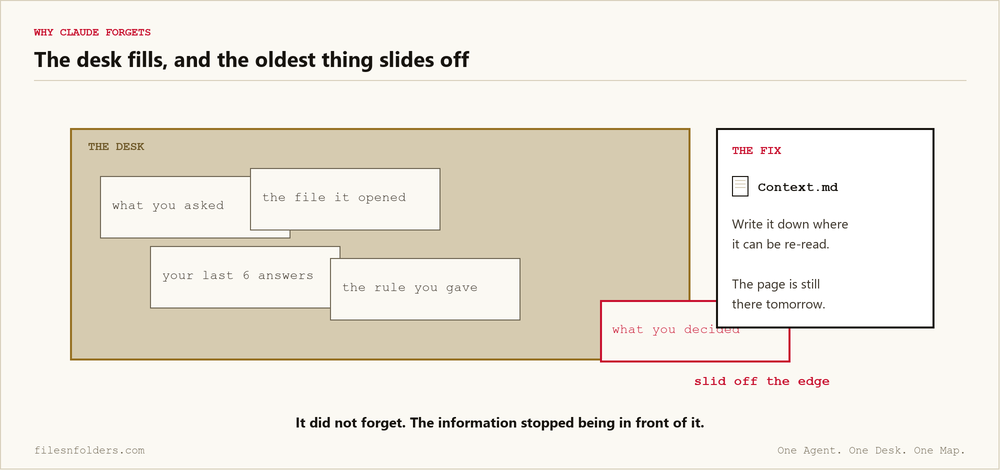
Your conversation has a size. Everything you have both said sits inside it, and when it fills up, the oldest part slides out of view. You may hear that called the context window. It simply means how much desk space the AI has, and a desk is exactly the right picture: put something new down, something already there gets pushed off the edge.
It did not forget the way a person forgets. The information stopped being in front of it. There is no drawer it can go check, because nobody built the drawer.
The 3 ways it shows up
It asks you something you already answered. Your answer scrolled off.
It repeats itself. It cannot see that it already said that.
It quietly gets worse over a long session. This is the one that fools people, because there is no error and no warning. It just gets vaguer, and you assume you are prompting badly. You are not. The desk is full, and what happens when the window fills is worth understanding properly.
Why upgrading usually does not fix it
This is the part I want to save you money on, because I did the expensive version first.
A paid plan buys you more usage. It does not buy the conversation a permanent memory. If the only place a fact ever lived was a chat, a bigger plan does not change what happens when that chat gets long. If your AI keeps forgetting your business, the brain interview folder is free and it draws the map for you.
I paid within about 10 minutes of signing up and had a $247.84 bill 50 days later, and I put the receipts on screen in Claude free vs pro. Watch that before you upgrade for this reason, because this is not the reason to upgrade.
Why memory tools are the wrong shape for it
The obvious next move is to buy something that remembers for you. I understand the instinct and I have spent money on it.
The trouble is that when the remembering happens somewhere you cannot open, a wrong memory is unfixable by you. You can only ask it to try again. That trade is worse than it sounds and I pulled it apart in AI agent memory.
The fix, and it is free
Stop asking it to remember. Write the thing down where it can read it.
One file that says what you are working on and what has already been decided. Your AI opens that file at the start of every session. Now the fact is not something being held in a fragile place. It is on the page, and the page is still there tomorrow.
~/business/
├── CLAUDE.md          <- read me first
├── Context.md         <- what we are doing, what is decided
└── ops/               <- the material
That is the shape of it. The full walk through of every folder is in the ICM folder structure, and the method it comes from is interpretable context methodology.
Do this tonight, it takes 20 minutes
1. Make a text file called Context.md where you already keep work.
2. Write 4 headings: what I am working on, what is already decided, where the files are, what is next.
3. Fill them in badly. Badly is fine. Empty is not.
4. Start tomorrow by telling your AI to read that file first.
5. When you finish something, add 1 line to it. That single habit is the entire maintenance, and it is the one people skip.
If you would rather start from something already written than a blank page, take my template. No card, and you can delete every word of mine out of it.
Every ICM Folder System I have built, the free ones and the ones people paid for, is on 1 page. Take the 1 that matches where you are.
The kit is 6 files. It takes 20 minutes. A start page. A map. A desk file. The folder skeleton. A setup sheet. A list of what to cancel. No card. No call. No course to buy.
Send me the folder system