Claude Code Memory: it's a text file you can open.
Ryan “RyMac” McKinney · USMC · 26 August 2026 · 4 minute read
People search for Claude Code memory the day after it forgot what you were doing, hoping there's a switch to flip. There's no switch. The memory is text files, read at the start of every session, and that's better news than a switch, because a text file is something you can open, read and fix.
The short answer
Claude Code's memory is files. It reads them when a session starts, and the one that matters most is the CLAUDE.md map file you write yourself. Anthropic's memory reference describes 2 systems, both loaded at the start of every conversation. Both are text on your machine. Neither is a mystery.
The 2 different forgettings
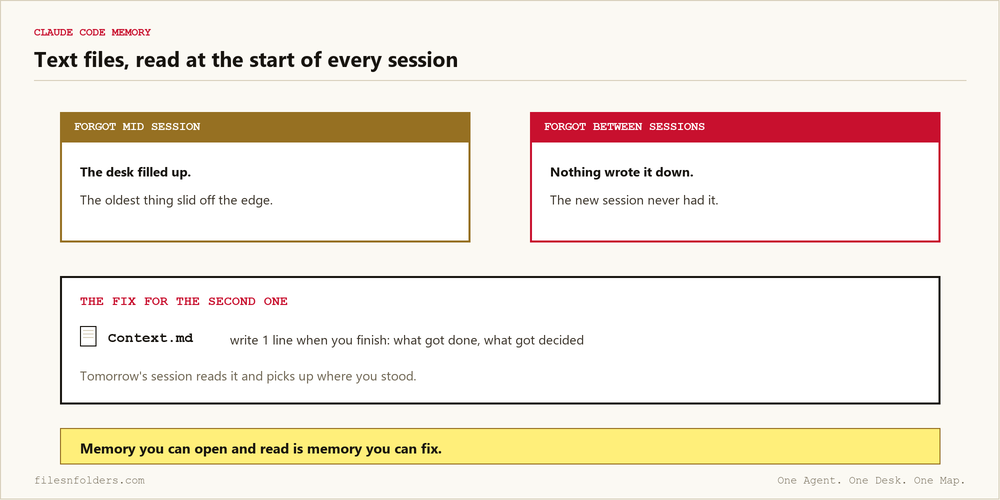
People say "it forgot" about 2 different failures, and they have 2 different fixes.
It forgot mid session. That's the desk. There's only so much room on it, and when a new thing lands, the oldest thing slides off the edge without announcing itself. That one's a space problem, and I walked through it in what a context window actually is.
It forgot between sessions. That's not the desk. That's nothing being written down. The new session didn't forget your decision. It never had it, because the decision lived in a chat that's gone now. If your AI keeps forgetting your business, the brain interview folder is free and it draws the map for you.
The second one is the one that costs an agency real money, and it's the one you can fix today with a text file.
What auto memory actually does
You may hear about auto memory, or a memory tool. It means the tool writes its own notes file as it works, and reads those notes back later.
Useful, with 1 caveat you should hear before you rely on it. Notes it writes itself are notes nobody reviewed. Treat that file the way you'd treat a new hire's filing: read what got saved, because you'll be living with it. The reason this doesn't scare me is the reason this site exists. It's a text file. Open it.
The memory system you write yourself
Here's what runs my businesses, and none of it needed a feature.
The map file stays short and points at where things live. The desk file says what's happening right now and what's already been decided. The folders hold the material, arranged the way the ICM folder structure arranges them. That's Jake Van Clief's arrangement, credited gladly.
Then the habit that is the entire maintenance: when you finish something, write 1 line in the desk file. What got done, what got decided. A session that starts tomorrow reads it and picks up where you stood.
There's a test for whether your memory setup works, and it comes from a man who ran his business on the folders for 41 days and wrote down what broke. Open a brand new session with zero memory of you. Ask it where a project stands. If it finds the answer in 2 moves, your filing is sound. If it can't, no memory feature will save you, because the information isn't written down anywhere.
Memory you can read is memory you can audit
The quiet advantage of memory-as-files shows up the day something's wrong. When your AI's memory is a black box and it starts acting strange, you're stuck guessing. When it's files, you open the drawer. I did that to my own setup on camera, no script, and the audit caught 2 of my own files telling opposite stories. Found in minutes, because everything was readable.
If your agency's version of memory is 1 person who knows how it all works, that's the fragile kind. The longer argument about agent memory is on this blog too, and the free kit below is the fastest way to have the files instead of the theory.
Every ICM Folder System I have built, the free ones and the ones people paid for, is on 1 page. Take the 1 that matches where you are.
The kit is 6 files. It takes 20 minutes. A start page. A map. A desk file. The folder skeleton. A setup sheet. A list of what to cancel. No card. No call. No course to buy.
Send me the folder system