ICM Folder Structure: every folder, named.
Ryan “RyMac” McKinney · USMC · 21 August 2026 · 4 minute read
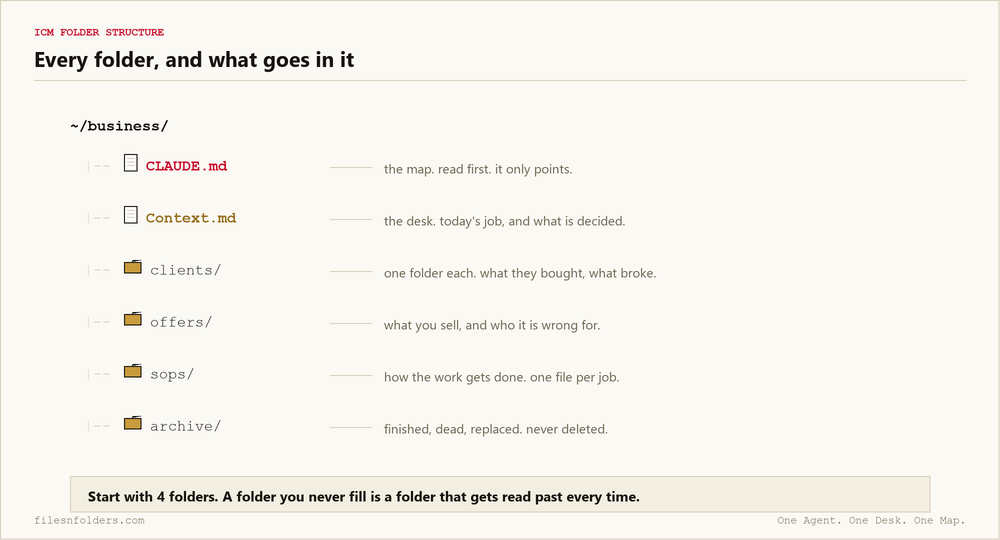
This is the ICM folder structure I run several businesses on, opened up and named. Not a diagram of an idea. The folders that are on my machine right now, what goes in each one, and the mistake I made in every single one of them before it settled.
The 2 files that do all the work
Everything below sits under 2 text files. If you only take 2 things from interpretable context methodology, take these.
CLAUDE.md, the map. Mine has been between 77 and 137 lines across every version I have ever saved. It does no work. It answers one question: where do I go to find out what is going on. Then it points at the desk file and stops. The stripped down starting version is 11 lines long.
One word before the folders. You may hear a folder called a directory, and you may see people write claude directory structure when they mean this exact thing. It simply means the folders, and how they sit inside each other. Same picture, developer clothes on it.
Context.md, the desk. What I am working on right now. What has already been decided so nobody re-argues it. Where the material lives. This is the file that gets updated when you finish something, and it is the file people skip, and skipping it is why their setup rots by week 3.
~/business/
├── CLAUDE.md          <- the map
├── Context.md         <- the desk
└── ops/
    ├── clients/
    ├── offers/
    ├── sops/
    └── archive/
clients/
One folder per client. Inside it, the things that would matter if you got hit by a bus: what they bought, what they were promised, what went wrong last time, and the last conversation.
What does not go in here: your process. Your process is the same for everybody and it belongs in sops. I had my own steps copied into 6 client folders once and changed them in 2 of the 6. That is how you end up arguing with yourself.
One folder per client is also what lets you do the same build twice. Copy the folder, change 3 files, and the second client is a 30 minute job instead of a 3 week one. That is the shape of an AI receptionist business you copy for every client.
One folder per client also keeps the reading short, and short reading matters more than people expect once you understand what a context window actually is.
offers/
What you actually sell, written out. Price, what is included, what is not, who it is wrong for.
The last line is the one people leave off, and it is the one the AI needs most. An agent that knows who your offer is wrong for will stop writing you proposals you would never have closed. If the offer itself is the folder system, sell it the backwards way or it will not close.
sops/
How the work gets done. One file per job, written the way you would tell a new hire on their first Monday.
These are the files that make an agent useful instead of chatty. It is the difference between asking it to write a proposal and handing it the way you write proposals. Same distinction I pulled apart in context engineering.
archive/
Finished, dead, or replaced. Not deleted.
This folder exists so the other 3 stay honest. The instinct is to leave finished work where it sits because moving it feels like effort. Then 6 months later your offers folder has 4 offers in it and 2 of them have not been for sale since spring, and your AI does not know which is which. It cannot know. Nothing told it.
The rule that keeps it from rotting
When you finish, you write down what you did in the desk file. One line. That is the entire maintenance.
Skip it for a week and the structure is still there but the desk is lying, and a lying desk is worse than an empty one. I have done this to myself. I ran an audit across 2 of my own businesses on camera and it found 2 of my own files telling opposite stories, and you can watch it catch me.
Running more than one business out of it
Give each one its own desk file. That is the split. The map at the top says which desks exist and the agent walks to the right one.
What you must not do is let 2 businesses share a desk, because the decisions contradict and the agent picks one at random. The longer version, with the 5 minute check that catches it, is in folder structure for an agency running multiple brands.
Where people get it wrong
They make the map do work. The map is a signpost. The moment you put standing instructions in it, you have 2 desks and they will disagree.
They build 14 folders on day 1. Start with 4. A folder you have never put anything in is a folder the agent has to read past.
They put it somewhere tidy instead of somewhere they go. Tidy is not the goal. The goal is that you are already standing in it.
If you want the exact files rather than the description, take my template and rename it. It is free and it takes 20 minutes.
Every ICM Folder System I have built, the free ones and the ones people paid for, is on 1 page. Take the 1 that matches where you are.
The kit is 6 files. It takes 20 minutes. A start page. A map. A desk file. The folder skeleton. A setup sheet. A list of what to cancel. No card. No call. No course to buy.
Send me the folder system