Claude Directory Structure: where everything actually lives.
Ryan “RyMac” McKinney · USMC · 22 August 2026 · 3 minute read
2 different questions get asked with the same words. One is where Claude keeps its own files on your computer. The other is how you should lay out your folders so it finds your work. Here are both, because you probably came for the second one and will need the first.
First, the hidden folder
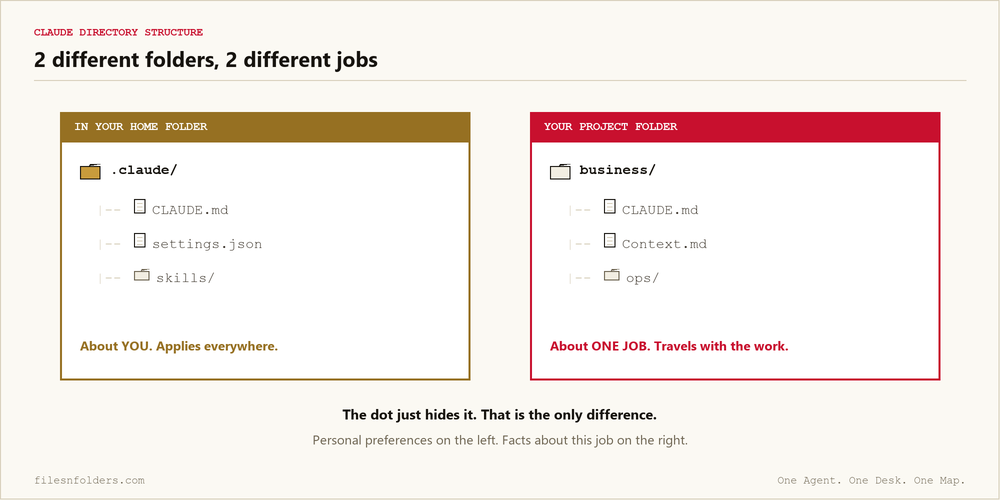
Claude Code keeps its own things in a folder called .claude in your home directory. You may see people write .claude folder or ask about .claude folder best practices and assume it is something complicated. The dot at the front simply tells your computer to keep the folder out of sight so it does not clutter the view. That dot is the only difference between it and any other folder.
Inside it are your personal instruction file, your settings, and anything you have added yourself. Anthropic’s own documentation covers the exact paths on each system, and it is the right place for that rather than a blog post that goes stale.
The important part is not where it is. It is what it means. That folder is about you and it applies everywhere you work. Your project folder is about one job. Putting the wrong thing in the wrong one is the most common mess, and the best practices post pulls that apart properly.
Now the question you actually came for
How do you lay out YOUR folders so it finds the right thing.
~/business/
├── CLAUDE.md          <- the map. read first, always
├── Context.md         <- the desk. what we are doing today
└── ops/
    ├── clients/
    ├── offers/
    ├── sops/
    └── archive/
That is the layout I run several businesses on. The map file does no work at all. It points at the desk file. The desk file says what is happening now. The folders hold the material.
Why the order matters more than the names
A folder called clients tells the agent what a thing is. It does not tell it where in the job it is standing. Those are different, and the second one is what stops the guessing.
That distinction is the actual finding in the paper this comes from, and it is why work that runs in stages gets numbered folders rather than tidy alphabetical ones.
The 3 places instructions get read from
Your home folder. Applies everywhere. Preferences about how you work.
The project folder. Applies to this job. Facts about this business.
A subfolder. When work moves into a subfolder that carries its own note, that note gets read too. This is the part people find late, and it is how several brands live under one roof without contaminating each other.
Where people go wrong
Somewhere tidy instead of somewhere they go. A folder you have to remember to visit is not a filing system. Put it where you already look every day.
14 folders on day 1. Start with 4. A folder you have never put anything in is a folder that has to be read past every time, and reading past things is not free, which is the context window in one sentence.
Deep nesting. If the material is 5 levels down, the map has to describe a journey instead of a location.
No archive. Finished work left in place makes the live folders lie about what is current.
Set yours up in 20 minutes
1. Make a folder where you already work. Not somewhere tidy.
2. Put CLAUDE.md and Context.md in it. The template for both is here.
3. Make 4 folders under it: clients, offers, sops, archive.
4. Open your AI in that folder and tell it to read the map and do what it says.
5. Run 1 real job, then write 1 line in the desk file when you finish.
The named walk through of every folder, including what does not go in each, is the ICM folder structure. The method underneath it is taught by Jake Van Clief at Clief Notes, and that is an affiliate link.
Every ICM Folder System I have built, the free ones and the ones people paid for, is on 1 page. Take the 1 that matches where you are.
The kit is 6 files. It takes 20 minutes. A start page. A map. A desk file. The folder skeleton. A setup sheet. A list of what to cancel. No card. No call. No course to buy.
Send me the folder system