The .claude Folder: opened up, piece by piece.
Ryan “RyMac” McKinney · USMC · 26 August 2026 · 4 minute read
Every guide to the .claude folder is written for a developer, full of file paths and example code. You don't need any of that. The .claude folder is a filing cabinet for instructions, it sits next to the folders your actual work lives in, and a business owner needs exactly 2 of the things inside it.
The short answer
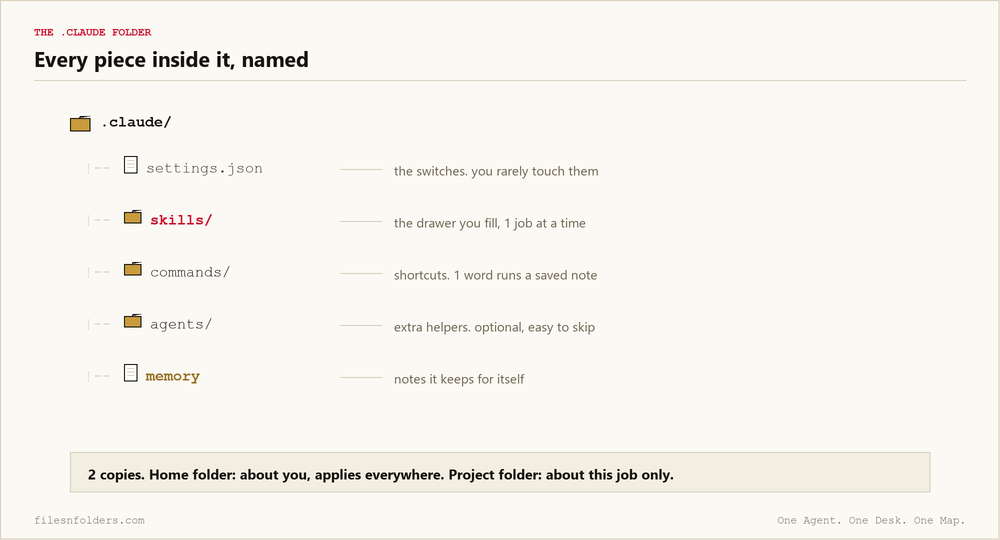
The .claude folder is where Claude Code keeps what it reads before it works: settings, skills and memory. The dot at the front hides the folder from normal view. That's the only thing the dot does. Anthropic's own reference lists everything it can hold, and most of that list is optional.
There are 2 copies, and the split matters. The one in your home folder is about you, and it applies everywhere. The one inside a project folder is about that job, and it travels with the work.
What's inside, in job terms
The settings file. The switches: what the tool may do without asking you. You'll touch this rarely, and when a guide tells you to paste something into it, that's the file they mean.
The skills folder. The drawer of skills: 1 folder per job you've written down, opened only when that job comes up. If any part of the cabinet earns your attention, it's this one.
The commands folder. You may hear these called slash commands. It means shortcuts: type 1 word, run a saved instruction. A shortcut is a skill with a nickname. The 14 skills I run my business on are free on the Claude skills page, put your email in and they come to you.
The agents folder. You may hear subagents. It means extra helpers with their own instructions, and it's where the over-engineering starts. 1 worker with a good map beats the roster, which is the argument this site keeps winning.
The memory. Notes the tool keeps for itself between sessions, which deserves its own page: Claude Code memory is a text file, not a feature.
How to create one
Mostly, you don't. Claude Code makes its own the first time it needs it.
If you want one inside a project, make a new folder and name it .claude, dot included. There's no setup wizard because there's nothing to set up. It's a normal folder wearing a hiding dot.
What a business owner actually needs in it
2 things. The skills drawer, filled slowly, 1 job at a time. And a short rules file, the kind I pulled apart in where rules actually belong.
Everything else in the cabinet is a developer's concern, and skipping it costs you nothing. Say you run a lead gen agency. Your results this quarter move on whether your offers and clients are filed where the worker can find them, not on whether your agents folder is configured. The work folders come first, and the map file at the top of them decides more than everything in .claude combined.
That's not my opinion about my own product, by the way. I watched it hold up under an audit I didn't script, on camera, where the folders caught my own files contradicting each other.
If you want the work folders handed to you named and ready, that's the free kit. It's the working copy of Jake Van Clief's Interpretable Context Methodology (ICM), his arrangement, run by me in public. The video version, Anthropic's own release notes on screen and the 14 skills ticking in 1 at a time, is written up in the Claude skills tutorial.
Every ICM Folder System I have built, the free ones and the ones people paid for, is on 1 page. Take the 1 that matches where you are.
The kit is 6 files. It takes 20 minutes. A start page. A map. A desk file. The folder skeleton. A setup sheet. A list of what to cancel. No card. No call. No course to buy.
Send me the folder system