A Claude skill is a folder with 1 text file. Anthropic sells the sharing. The folder is free.
Ryan “RyMac” McKinney · USMC · 14 September 2026 · 9 minute read
Anthropic shipped 2 skills features this month and both of them live on Team and Enterprise plans. Shared skills, so 1 person builds a skill and the room gets it. Smart reports, so the plan finds the work your team keeps repeating and hands you a prompt to turn it into a skill. I've been doing both for free since July, with a folder. This is the Claude Code skills tutorial I'd give a small business owner who can't buy a seat and doesn't need 1.
8 minutes. The 2 Anthropic pages on screen, the folder built 1 line at a time, how to make a skill in about 2 minutes, and the 14 I run on, each 1 with what it gets you.
The short answer
A Claude skill is a folder on your computer with 1 text file in it. The top of the file says when it fires. The rest says how you do the job. Claude reads it and does the job your way every time, so you never re-explain it again.
Shared skills, the Enterprise feature, is that same folder sitting on the other person's computer. Copy it, paste it, done. Smart reports, the other Enterprise feature, finds the work you keep repeating. You already know what you keep repeating. It's the thing you typed into Claude 5 times this week.
What Anthropic actually shipped
I read both pages before I said a word on camera, because a react video that gets the facts wrong is a video you have to take down.
Smart reports went into beta on September 10, 2026, on Claude Enterprise plans. Anthropic's own release notes say a report looks at how a team uses Claude, what it costs, where sessions run into friction, and which repeated patterns are worth packaging as shared skills. Each 1 of those comes with a suggested prompt you can copy to set up the skill.
Shared skills is the sharing side. The help article on managing skills for your organization says organization wide skill management is available to Team and Enterprise plans. A shared skill is view only. The person it's shared with can use it but can't edit it. When the owner saves a new version, everyone it's shared with gets the update the next time they use it.
Read that last part again. 1 person writes the skill. Everyone gets it. When it changes, everyone gets the change. That's the feature.
Now here's what that feature is made of.
What a skill really is
It is files and folders on your computer. It starts with a hidden folder called .claude. I opened that 1 up piece by piece in the .claude folder post if you want the full tour. For skills you only need 3 levels.
Inside .claude is a folder called skills.
Inside that, 1 folder per job. It's named for the job, so mine reads write-my-sales-letter right on the folder.
Inside that, 1 text file called SKILL.md. That file is the skill.
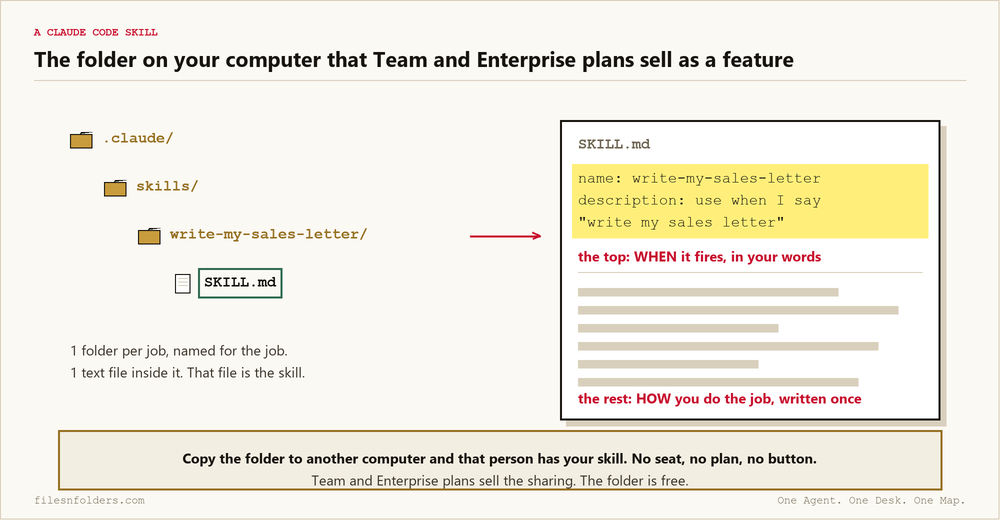
The top of that file says when to fire. The name, and the words you'd say when you want it. Use when I say write my sales letter, or draft the letter. That's how Claude knows to reach for it without you asking.
Under that is how you do the job. The steps. The rules. The taste. Written once.
So I never re-explain it again. Claude reads the file and does it my way every time.
How to make 1 in about 2 minutes
You're not going to write a single file yourself. You're going to tell Claude Code to write it.
Step 1. Open Claude Code and tell it which job you keep re-explaining to it every time.
Step 2. Tell it to make a skill for that job. Then tell it how you do the job, like you'd tell a brand new hire.
Step 3. It builds the folder and the file for you and puts them in the proper place. I make all of mine global, which means the folder lives in the .claude folder under your user name instead of inside 1 project, so every project can use it.
Step 4. Read the top of the file. Fix the words to what you'd actually say. That's what makes the skill fire.
Step 5. Restart Claude Code. Ask for the job like normal. The skill fires on its own.
2 minutes. That job is written down for good and you never explain it again.
That's the part smart reports is built to find for an Enterprise. The work you keep repeating. A Marine sent me 3 screenshots last week and the 43 copy Claude Code mess in them was the same thing, re-explaining. When you find yourself repeating something, write it in the file. The repeating stops. The report costs a seat and the file costs nothing.
The 14 skills I run my business on
I actually have dozens. These are the most used ones, and they're the ones I put in the room. I posted them in my free Skool on July 26 with 1 line about why I built them. I had to re-explain stuff to Claude every new project, and I have a bunch of projects. That's the exact problem smart reports was built to find, 6 weeks before it shipped.
Here's each 1 and what it gets you. If you only want the top 6 and why those 6, that's the best Claude skills post.
Niche research, so that you learn if a niche can afford your thing, their pains, their language, marketing angles, to build out a well positioned offer.
Headline copywriting, so that you get the headline and the hero that stop the scroll (the most important element of a page).
Direct sales copy, so that you get a direct-letter style sales letter aimed at 1 reader that makes them feel understood.
Sales page builder, so that you get the full page in the order that converts (filesnfolders.com converts 1 in 4 cold readers into a subscriber).
Profit calculator, so that your prospect runs their own numbers because nobody argues with their own math (allodra.ai for an example).
Paid traffic landing page, so that you get a 1 decision page that matches the ad, maximizing ad spend and conversions.
Exit pop, so that you catch the visitor on the way out with a "mini-sales page" with a new positioned free thing (allodra.ai for an example).
Call funnel, so that your site traffic turns into booked calls on 1 calendar.
Relationship sequence, so that you get the 10+ emails that train a subscriber on opening your emails & learning about you (subscribe to see mine).
VSL copywriting, so that you get a video sales letter written 1 slide at a time.
Video script, so that you get a short teaching video written the same way (the video above was written with it).
SEO writer, so that you get a 1 keyword targeted blog post that ranks & follows best practices (you're reading 1).
AEO blog writer, so that you get the post that Google AI and ChatGPT quote back.
Code audit, so that you find the bugs, the slow spots, and the SEO holes on any site you ship.
14 skills. 14 folders. Every 1 of them is a text file I wrote once. All 14 are free on the page under the video. Type your email in and they come to you.
Shared skills without a seat
A member of my room ran every 1 of those 14 through a skill checker and posted the result. Nice job RyMac. Claude said it was well written too. That's a real person running my files on their own business, and here's how he got them.
I put the folders in the room. He copied them onto his computer. Done.
That's shared skills. The Enterprise version adds a button, a view only lock, and an automatic update when I save. The free version is you copying a folder, and reading the file before you run it, which you should do anyway.
If you run an agency, this is the part to hear. A 4 person web design agency writes the same brief to Claude 4 different ways, because 4 people each explain it their own way. 1 skill folder, copied to 4 computers, and all 4 get the same brief the same way. When the owner changes it, the owner sends the folder again. No seat tax. No plan to upgrade. A folder.
Do it tonight
Open Claude Code. Tell it the 1 job you re-explained this week. Tell it to make a skill for it. Read the top of the file. Restart. Ask for the job.
Then grab my 14 off the page under the video, drop the folders into your skills folder, tell Claude Code your business, ask for a sales letter, and watch it fire.
The lesson and the check-in for these live in the Build Market Close community. That's where people post what they built with them.
The folder method these skills live inside is Jake Van Clief's and David McDermott's Interpretable Context Methodology (ICM). The skills are mine. Claude Code reads the folder. Files and folders make it free.
Every ICM Folder System I have built, the free ones and the ones people paid for, is on 1 page. Take the 1 that matches where you are.
The kit is 6 files. It takes 20 minutes. A start page. A map. A desk file. The folder skeleton. A setup sheet. A list of what to cancel. No card. No call. No course to buy.
Send me the folder system