9,916 files in 1 folder: how I organize everything for Claude Code.
Ryan “RyMac” McKinney · USMC · 18 September 2026 · 11 minute read
A paying member looked at my setup and asked how 1 folder isn't a mess. Fair question. It holds 9,916 files, 2,205 folders and 2.64 million words, and I don't paste context into a chat window anymore. What's underneath it is Jake Van Clief's ICM folder structure, run in public on a real business instead of drawn on a whiteboard.
The short answer
Give every folder 3 things. A map, a note about today, and the work. Then repeat that same shape at every level, all the way down.
Claude Code reads the map wherever it lands. The map tells it which door to open next. You stop explaining where things are, because the folder already says.
9,916 files you can work in and 9,916 files you're scared to open look identical from the outside. The map is the only thing separating them.
What page 1 hands you instead
I went and read what ranks for this. Two kinds of page, and neither one is for you.
The first kind is a developer tutorial. The anatomy of the .claude folder with .NET examples. How to structure it for maximum efficiency. Good pages, written by engineers, for engineers.
The second kind is a software company selling you an auto sorting tool. Search how to organize files for AI and you get 7 of those in a row, all promising to tidy your drive while you sleep.
Even the ones that say "no coding required" open by installing an editor. One of them tells you the screen looks intimidating and asks you to push through it.
Here's what none of them do.
Nobody shows a real folder. Every example is a spotless template with 6 perfect filenames in it. Nobody opens a workspace that has 6 months of actual business in it, including the ugly parts.
Nobody admits it drifts. One page gets close, mentions that upkeep needs an owner, then sells a 30 day cleanup. The rest treat the folder as finished the day you build it.
Nobody handles more than 1 client. I looked at 36 results. Every single one assumes 1 person with 1 project. If you run an agency with 4 retainers plus your own marketing, page 1 has nothing for you at all.
That's what this post is. A real folder, the drift, and more than 1 business in it.
What 9,916 files actually looks like
I run 5 businesses. My own software. A teaching brand. A sales system for veteran owned home service shops. Client builds I did for other people's companies. My dad's mobile notary business in Suffolk, Virginia.
All 5 live in 1 folder on my desktop. 41 folders at the top level.
Nothing about those businesses connects. Different customers, different money, different words on the page. They sit next to each other because they share a shape, not a subject, and the shape is all they have in common.
Here's the part people don't believe until they watch it. I asked my AI a question about my dad's notary business on camera. It went straight to his folder, read his map, came back with the answer. I never said the word notary in the prompt.
Then I asked it to count my email list. It went somewhere else entirely and counted 630 real people across 7 lists, straight off the database. Same session. No context pasted either time.
The 3 parts, in the only words that matter
Forget the letters for a minute. Picture a desk.
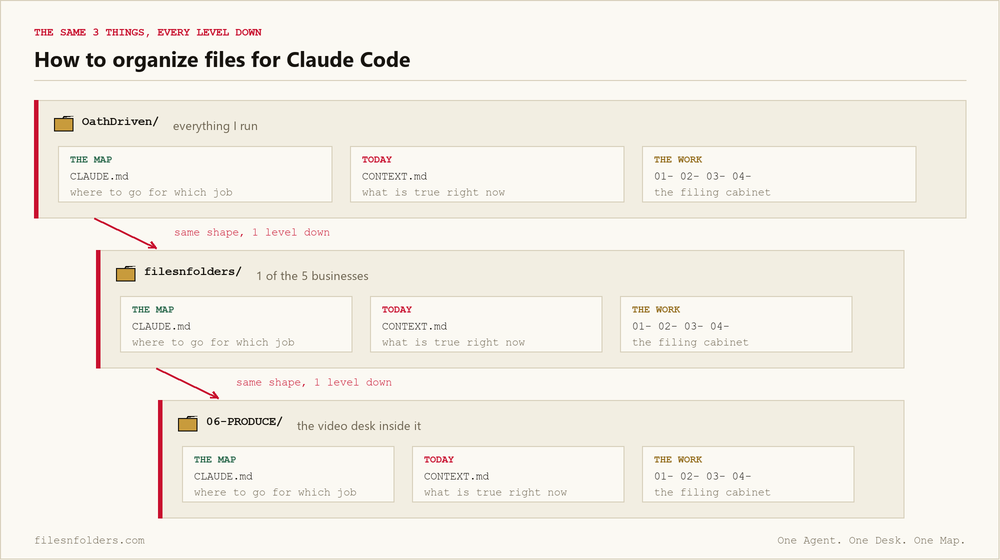
On the desk there's a map. It says what's in here and which drawer to open for which job. Mine is named CLAUDE.md, and that file is doing more work than people think. It's the only file allowed to route a job. Nothing else claims that.
Next to the map there's 1 sheet with today's truth on it. What's done, what's next, what changed. Mine is named CONTEXT.md. It's separate from the map on purpose, because the map changes rarely and today changes daily. Mixing them is how both go stale.
Under the desk there's a filing cabinet. The numbered folders holding the actual work. 01-RESEARCH. 02-OFFER. 03-MARKET. 04-CLOSE.
That's a folder in this system. A map, a state file, and the work.
Now do it again 1 level down. My top folder is a desk. Inside it, my FilesNFolders folder is a desk. Inside that, the folder where I produce videos is a desk. Same 3 things every time.
You may hear people call this context engineering. It means putting information where the AI will find it instead of carrying it there yourself.
Jake Van Clief's name for it is Interpretable Context Methodology, ICM for short. Interpretable means the AI can work out where it is on its own. That's the promise, and the repeated shape is what delivers it.
Why it doesn't rot in 3 weeks
I put 4 topics up for a vote on YouTube before I filmed this. Rob Medina picked this one and told me why.
His words: start with how it doesn't rot in 3 weeks, because if you can't answer that, the other 3 are the meme in your picture with nicer folder names.
He's right, and it's the question every folder guide dodges. Anybody can build a clean tree on a Sunday. Almost nobody has the same tree working 3 weeks later.
A folder system rots for 1 reason. Nothing in it is responsible for staying true.
You write a map on day 1. On day 9 you add a folder and don't touch the map. On day 20 your AI reads the map, walks to a door that isn't there, and guesses.
Once it guesses once, you stop trusting it. Once you stop trusting it, you stop using the map. Then you're back to pasting your project into a chat window, except now you also have 2,205 folders.
The rot isn't in the folders. It's in the gap between what the map says and what's actually on the disk.
The 4 things that keep mine alive
The map, so that your AI has 1 door to walk through. 1 file per folder with that job. Never 2 files claiming it, which is its own kind of mess.
The state file, so that your AI knows what's true today. Newest at the top. Mine is 617,000 characters of what happened and when. My AI reads the top of it to catch up instead of asking me.
Rules with teeth, so that a rule holds when you forget it. A rule written in a file is a suggestion. A rule that runs on its own is a rule. Mine refuse to save a file that breaks them, before it touches the disk. I've got 1 that won't let an em dash through, and it has stopped me personally more than once.
A weekly check, so that drift gets caught while it's small. Not a vibe check. An actual run that opens every door on the map and reports the dead ones.
I audit the thing by typing 3 words
Am I crazy?
That's the prompt. It fires a real check against a real rubric.
It walks every route in my map and tells me how many resolve. It finds folders sitting on disk that appear nowhere in the map. It finds the strongest rule I've written down, then shows me where I broke it.
The answer is usually no, you're not crazy, here are 3 things that drifted. I fix the 3 and it's clean again.
A system can answer that question with a number. A screenshot of a folder tree can't answer it at all.
Run it every Sunday. If it comes back clean 3 Sundays running, your system doesn't rot. If it comes back dirty every single time, the map is wrong, not the folders.
Why 1 folder beats 5
This is the question I get most from agency owners, and the answer surprises people.
You don't need a folder system per client or per brand. You need 1 tree with a desk for each.
1 map to maintain, so that you're not rewriting the same rules 5 times. My voice rules, my number rules, my "never render on my own machine" rule. Written once at the top. Everything under it inherits them.
Work moves sideways for free, so that a thing you proved for 1 client shows up for the next. The page layout that converted for my software got reused on my dad's site in an afternoon. Same folder, so nothing had to be hunted down first.
Your AI holds 1 picture, so that it stops asking which project this is. 5 separate folders means 5 separate conversations. It also means 5 chances to point it at the wrong one.
1 backup, so that a dead laptop costs you nothing. Mine saves itself after every answer and pushes off the machine without me clicking anything.
A 6 person creative agency running 9 client brands has my problem at a smaller count. So does a lead gen agency with 4 retainers and its own offer. The shape holds either way.
The 1 rule that keeps 41 folders from becoming 41 problems
Every business gets its own desk, and a desk never reaches into another desk.
My dad's notary folder has its own map, its own state file, its own voice rules. Nothing in it edits anything in my software folder.
When 2 businesses need the same thing, it moves up a level to the shared floor. It never gets copied sideways.
Copying sideways is the failure, and it's the most common 1 I see. I cleaned up a member's brain a week ago that had 43 copies of the same file, and every copy existed because somebody was scared of breaking the other one.
What it looks like on a normal Thursday
I pulled my live search numbers on camera while filming this. 45 blog posts live. 1,322 impressions. 61 clicks. It read those off Google itself, in the session, because a skill I wrote months ago sits in the same folder.
Then it counted my email list off the actual database and told me 630 real people across 7 lists, with the demo rows and test entries pulled out.
I didn't prepare either of those. So I filmed them instead of describing them.
Both worked because the map already knew where my search tool lives and where my database lives. I wrote those lines once, months ago. I haven't thought about them since.
What this is not
It's not a template you download and fill in. Every template I've seen hands you Projects, Areas, Inbox and Archive. Those 4 words describe nobody's actual business.
It's not a swarm of AI agents handing work to each other. I run 1 agent with a good map. The folder structure is the part doing the work, not the agent count.
It's not clean either. My folder has parked work in it, a dead brand I keep for history, and things I started and never finished. The map says all of that out loud, which is exactly why none of it slows the AI down.
Where to start, if you start today
Don't build folders first. That's the mistake, and everybody makes it.
Start with the map, because folders with no map are a pile with better names.
Open the folder you already work out of. Ask your AI to read it and tell you 3 things per folder. Does it have a map. Does it have a state file. Would it know where to start if you gave it a job with no other instructions.
The folder it flags as the worst is the 1 you fix first. Not all of them. One.
If you'd rather have your AI interview you and draw the map off your answers than guess at it yourself, the brain interview is free. It asks the questions. You answer in your own words. It builds your map from that, with nothing to fill in.
Every ICM Folder System I have built, the free ones and the ones people paid for, is on 1 page. Take the 1 that matches where you are.
The kit is 6 files. It takes 20 minutes. A start page. A map. A desk file. The folder skeleton. A setup sheet. A list of what to cancel. No card. No call. No course to buy.
Send me the folder system