Every YouTube video becomes a Skool lesson. In under 10 minutes.
Ryan “RyMac” McKinney · USMC · 14 September 2026 · 11 minute read
Every video I publish on YouTube becomes a Skool lesson in my community. It's all done in under 10 minutes using my ICM folder structure and 1 prompt in Claude Code. In under 60 days there are 571 people in that Skool, and the fire badge on my name says I'm active. I didn't ask for it. It showed up because every lesson ships with files.
14 minutes. The 4 things a lesson needs, then me on my own desktop opening the real package file by file and following 1 zip to the 3 places it lands.
The short answer
A Skool lesson needs 4 things. The video, the post, the files, and a place to talk.
Most classrooms have the video and nothing else. Those get watched once. A lesson that ships files gets used, because a member can point their own AI at the file and run it on their own business.
The folder that makes all 4 is the end-session package. It's the part that flashed by for half a second in my production line video. This post opens it all the way.
Why a video alone gets watched once
A member asked me if I could add a lesson check-in to my classrooms like Jake does. Fair question. So I went and looked at what a lesson in his room actually has.
It's 4 things. The video. The post that tells the story of the session. The files attached at the bottom. And a place to talk about it.
If your classroom is just uploaded videos with no files, people watch once and leave. There's nothing to take with them. The lesson lives in their head for a day and then it's gone. The package that turns a video into a Skool lesson is free on the YouTube to Skool page.
A lesson that ships files does something for them. They open the file, paste it into their AI with their own business in it, and run the prompt at the end. That's why they come back. That's where the 571 came from.
Where each of the 4 comes from
Skool has an add button under every lesson. Files, links, transcripts, or a pinned community post. So every lesson of mine gets the video, the drop post as the lesson text, the zip under add, and a pinned check-in post.
The video is the video. You already made it.
The post is the drop post. The story of the session with the mistakes left in, then the files 1 line each, then how to use them, then what's next. I paste it once and it's the lesson text.
The files are the zip. It goes under add as a resource. Same zip that goes everywhere else, and I'll get to that.
The place to talk is the pinned check-in post. A community post about that 1 lesson, pinned under it, so the discussion lives on the lesson instead of getting lost in the feed.
The package, file by file
It starts in the video's own folder, not a download. 1 video is 1 folder. When the render finishes, the script and every word I said are already on disk in that folder. So the package starts there. The line never re-watches its own video.
Here are the 6 files it makes.
1. The drop post. The Skool post. The story of the session with the mistakes left in. Then the files, 1 line each. Then how to use them. Then what's next. Paste ready, no formatting to fix.
2, 3, 4. The strategy files. 2 to 5 of them, 1 per thing that mattered in the video, not 1 per chapter. Each 1 teaches the thing in plain words, then ends in a prompt the member pastes into their own AI with their own business in it. The prompt is the product. The rest is packaging.
5. The term sheet. Every term from the video in 1 line each. Cheap to make. Huge for the person who's new.
6. The room record. Who built what off this lesson, in their own words, including what broke. It ships mostly empty and fills up as people post. People share more when they see themselves in the record.
Then the zip. The strategy files, the term sheet and the record, zipped. The drop post stays out because it's the post. 1 file, made once.
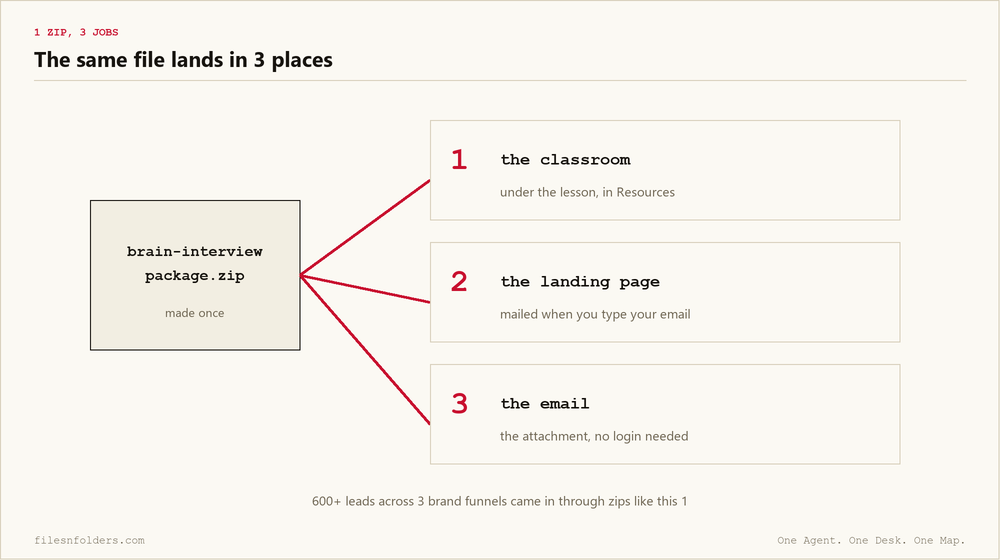
1 zip, 3 jobs
Here's the 1 from my last video, the brain interview folder.
It's the download under the lesson in the classroom.
It's the same file the landing page emails you after you type in your email.
It becomes the attachment in that email, so people instantly get what they asked for. Anyone's AI can open it without a login, or even joining my Skool if they choose.
600 plus leads came in through zips like that 1, across 3 different brand funnels. I had my AI count it off the CRM before I said it on camera. 662 contacts across the 3 lists.
How the pages connect
YouTube is the traffic. The description under every video points at a landing page for that video. The landing page has the video on it and an opt in box under it that trades the zip for an email.
The thank you page after it is 3 steps. Check your email. Here's what to do with the file. Get in the Skool.
The email carries the zip as an attachment, the 4 clicks to open it, and a P.S. that says reply and it comes straight to me.
Some people never join anything and still run the folder. That's fine. Their AI is running my folder. The ones who join land on a lesson that has the same zip under it and a check-in post waiting.
Why this matters more if you run an agency
An agency owner with 6 clients records a training for 1 of them and it dies in a Loom link. The next client asks the same question and you record it again.
Run the package on that 1 recording and you have a lesson with files. The files are text, so the next client's AI can run them on the next client's business. You made it once. It keeps working after it.
That's the part I want you to hear. The video gets watched once. The folder keeps working after it.
Do it tonight
The 3 strategy files, the term sheet and the room record from this video are under the lesson in the Build Market Close community. Start with the-4-things-a-skool-lesson-needs.md. Paste it into your AI with 1 lesson you already have, run the prompt at the end, and it tells you which of the 4 you're missing.
If you have the production line kit, the skill that builds the package is already in it. Open your AI in the video's folder and say package this for my community. That's the move.
Post your first lesson built this way in the Skool and I'll tell you which of the 4 things it's missing.
The folder method is Jake Van Clief's and David McDermott's Interpretable Context Methodology (ICM). The end-session package, the production line, and the 4 things a lesson needs are mine. Claude Code turns the video into the classroom. Files and folders make it repeatable.
Every ICM Folder System I have built, the free ones and the ones people paid for, is on 1 page. Take the 1 that matches where you are.
The kit is 6 files. It takes 20 minutes. A start page. A map. A desk file. The folder skeleton. A setup sheet. A list of what to cancel. No card. No call. No course to buy.
Send me the folder system