Claude Code Commands: you need 3, not 50.
Ryan “RyMac” McKinney · USMC · 29 August 2026 · 5 minute read
Search this and you'll find a list of 50 commands, then another list of 57. Both are real. Both are useless to an agency owner. They mix 2 completely different things together and never tell you which is which. Here's the split. And the 3 that earn their place next to everything else in the .claude folder.
The short answer
A command is a shortcut you type with a slash in front of it. There are 2 kinds and they have nothing to do with each other.
Kind 1 ships with the tool. These drive the session itself. Clear what it's holding. Switch models. Check your usage. Anthropic's own reference lists them all, and you didn't write any of them.
Kind 2 you write yourself. A saved instruction with a nickname. You type 1 word instead of retyping a paragraph you've typed 20 times.
Every "50 best commands" list on page 1 pours both kinds into 1 bucket. That's why the lists feel like homework.
The 1 built-in command you'll use daily
Clearing what the tool is holding. The rest of the built-ins can wait until you need one.
Here's why that 1 matters more than the other 49. The tool has a desk. The desk fills up. When it fills, the thing you told it 40 minutes ago falls off the edge. That's the context window filling up, and clearing is how you sweep the desk before starting something unrelated.
People search for a thinking command too. What they're after is telling it to work harder on a hard problem before answering. Useful. Not daily.
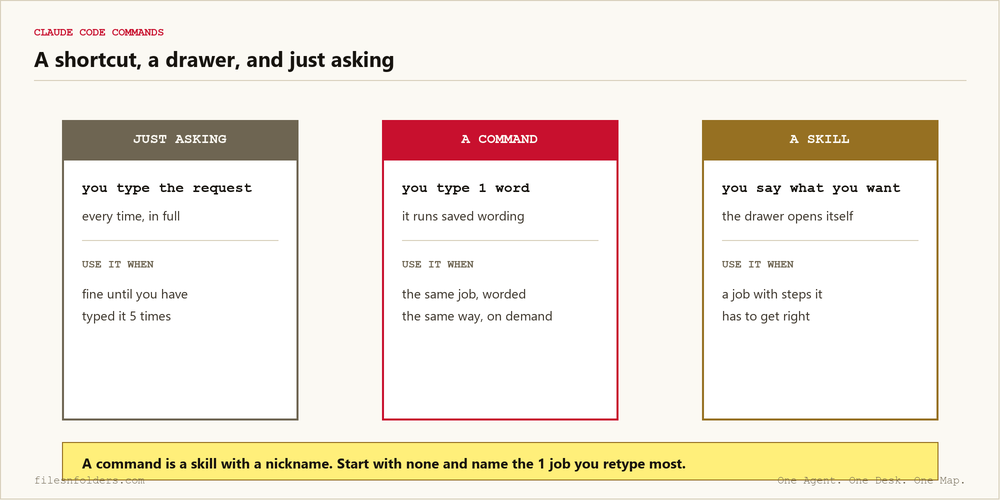
A command, a skill, or just asking
This is the part nobody separates, and it decides whether you ever need to write a command at all.
Just asking is fine. You type what you want. It does it. Nothing to build.
A command is for when you've typed the same request enough times to resent typing it. You save the wording. You give it a nickname. Now it's 1 word.
A skill is for a job with steps that have to come out right every time. The difference that matters: you fire a command on purpose. A skill opens itself when the job comes up. You may hear people call that automatic loading. It means you don't have to remember it's there.
So the honest order is: ask, then command, then skill. Most people are told to start at the far end.
The first custom one an agency owner should write
Say you run a 4 person SEO agency. Every Monday you paste the same request: read this client's folder, tell me what changed, tell me what's overdue. Same wording every time. You've typed it 30 times.
That's the first command. Not because it's clever. You already wrote it 30 times by hand.
A review command is the same shape. So is a weekly recap. The test never changes, and it's the same test I use on a hook. Have you typed this before? Will you type it again?
If both answers are yes, name it and put it away. If not, keep asking. A drawer full of shortcuts you never fire is just more to maintain.
Why the lists feel overwhelming
They're written by people who use this tool to write software for 8 hours a day. For them, 50 shortcuts is a reasonable morning. For you it's a wall.
The 57 command list on page 1 is real work by someone real. It's aimed at a developer. Reading it as a business owner will convince you that you're behind. You're not behind. You have a different job.
What actually decides your week is whether your clients, your offers and your material are filed where 1 worker can find them. Shortcuts come after that, and the map file at the top of the folders does more than every command on that list combined.
If you want the folders handed to you named and ready, that's the free kit. It's the working copy of Jake Van Clief's Interpretable Context Methodology (ICM), his arrangement, run by me in public.
Every ICM Folder System I have built, the free ones and the ones people paid for, is on 1 page. Take the 1 that matches where you are.
The kit is 6 files. It takes 20 minutes. A start page. A map. A desk file. The folder skeleton. A setup sheet. A list of what to cancel. No card. No call. No course to buy.
Send me the folder system